 BundleUp
  Cartify
  Vouch
Vouch Importing and translating product reviews on Shopify without bad machine translation
How to import genuine reviews from AliExpress, Loox or Judge.me into Shopify, translate them so they read naturally, and show them where shoppers decide.
By the Rofsky Solutions team 4 min read

Reviews do their work on the product page, where the shopper is deciding. A new product with no reviews looks risky, and a product with reviews in a different language looks worse: it tells the shopper the store didn’t care enough to translate.
Many merchants sell products that already have genuine reviews somewhere else, on the supplier’s listing or in a previous reviews app. This guide covers how to bring those reviews into Shopify, translate them so they read like a person wrote them, and show them well. The examples use Vouch, our reviews app.
First, the honest part
Imported reviews are only useful if they are real. Three rules keep them that way:
- Same product only. Import reviews written about the exact product you sell, not a similar one.
- Keep the meaning. Translate, fix typos, but don’t change what the reviewer said. Don’t drop every three-star review either; a few honest mixed reviews make the rest more believable.
- Never add reviews that weren’t written. Rules on misleading reviews differ by country, and shoppers can tell.
Vouch can show reviewer names as initials only, which keeps imported reviews closest to the original.
Why literal machine translation reads badly
Reviews are informal. People write “runs small, size up”, “zero break-in”, “my kid loves it, dad less so”. A word-for-word translation keeps the words and loses the meaning: idioms come out literally, product terms get the wrong word, and the tone turns stiff. Shoppers notice, and a review that reads like a robot wrote it is worse than no review.
AI translation handles this better because it translates the sentence, not the words. It keeps the tone casual, chooses the term a native speaker would use, and handles slang and sizing language. It is still worth a quick read before you publish, especially for less common languages.
Step by step: import from AliExpress with translation
In Vouch, go to Import reviews > AliExpress.
- Pick the Shopify product the reviews belong to.
- Paste the AliExpress product link. It must be a direct item link, such as
https://www.aliexpress.com/item/<number>.html, not a search page or a store page. - Choose what to import:
- Sort by: Most relevant or Newest first.
- Minimum star rating: 5 stars only, or 4 and up.
- Maximum reviews to import: 1 to 200 (default 20).
- Pictures only: keep only reviews with photos.
- Translation: one of 18 languages, or keep the original.
- Prevent duplicates: skip reviews already imported from the same product.
- Click Start Import. The progress screen moves from “Scraping AliExpress” to “Translating” to “Complete”.
- Read and edit, then click Approve All & Publish.
Photos are transferred to Vouch’s storage in the background, so they can take a few minutes to appear. Fewer reviews than you expected usually means your filters were strict (minimum stars, pictures only, duplicates) or the listing simply had fewer.
A good first import is 20 reviews, 4 stars and up, pictures only. It shows you the translation quality before you bring in more.
Moving from Loox or Judge.me
If your reviews are in another app, export them as a CSV (Loox and Judge.me both offer an export) and use Import reviews > Loox or Judge.me in Vouch. For bulk edits later, Edit in spreadsheet exports all your Vouch reviews, lets you change them in any spreadsheet app, shows a preview of the changes, and uploads them again.
Show them where shoppers decide
Importing is half the job. Vouch adds reviews to your theme as blocks you place in the theme editor:
- Review widget: the star summary with bars, review cards with photos, a write-a-review popup and load more.
- Star rating: stars and the review count under the product title.
- Snippet carousel and review carousel: short quotes or full reviews, photos first.
- Hero reels: your own vertical videos in a carousel, also in a stories style with round thumbnails. Videos start muted.
- Tabs: your own short answers to common doubts, such as fit or comfort.
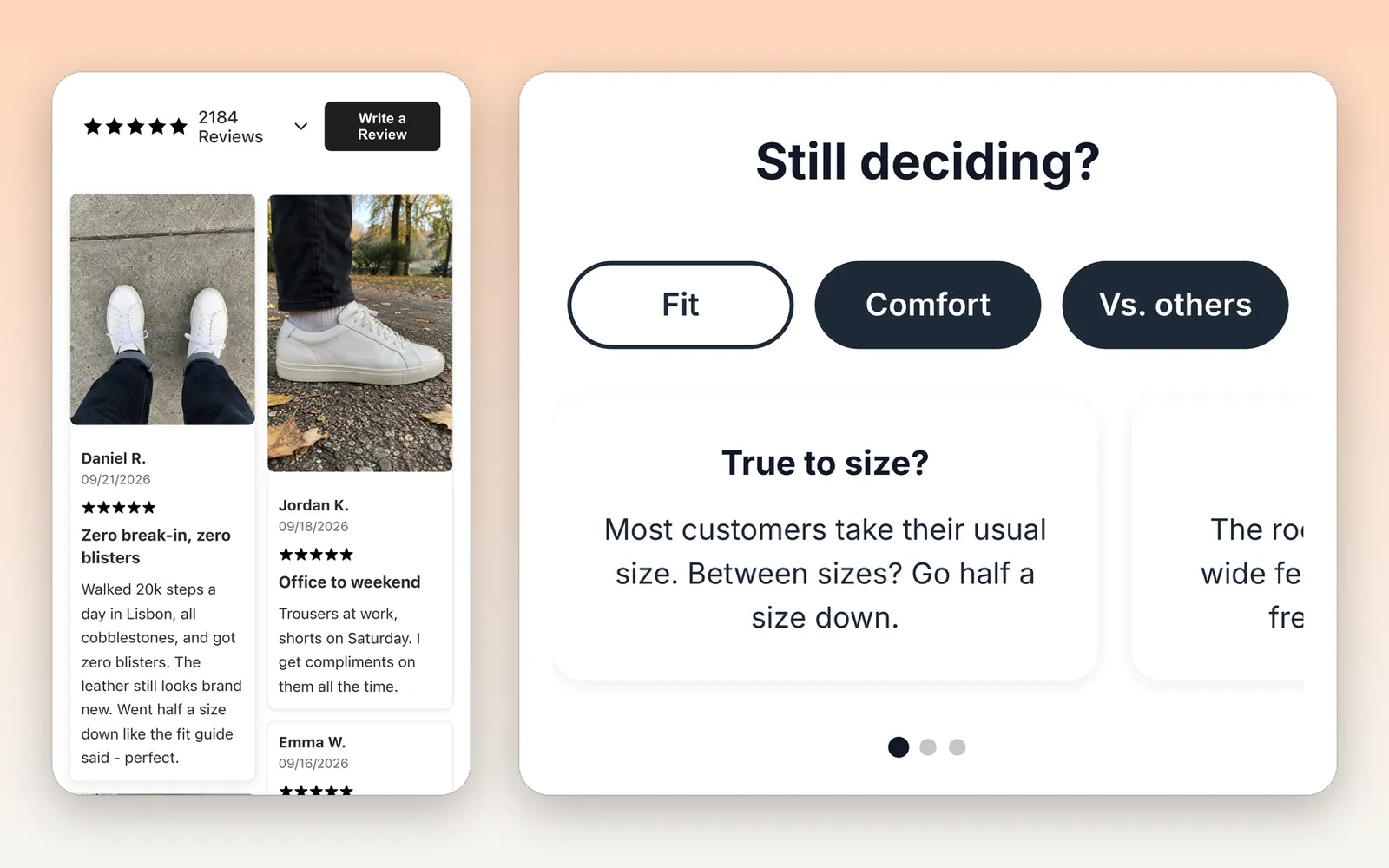
The review widget, and tabs that answer “Still deciding?” in your own words.
Two settings make a big difference. Pin your most useful reviews so they show first; there is no visible pin marker, they simply lead. And if you sell the same item as separate products (one per color, say), a product group combines their reviews live on every member, so each page shows the full picture.

Hero reels: short vertical videos that show the product in use.
Collect new reviews from real buyers
Imported reviews get a product started. New reviews from your own customers keep it credible. Vouch doesn’t send emails itself; instead, the Review Emails page gives you a review link for the post-purchase email you already send from Shopify Email, Klaviyo, Omnisend or Mailchimp. The link carries the order and the email, so reviews left through it are tagged as genuine purchases. There is also a ready-made block of five clickable stars to paste into the email.
Buyers can add photos when they write a review, and reviews are published automatically by default. You can still reject or edit any review on the Reviews page.
Let the reviews answer questions too
Reviews are also the best material for answering shoppers. Vouch’s optional AI sales agent reads the product’s average rating, review count and up to six approved reviews, pinned ones first, and can quote them when a shopper asks “Does it run small?”. The better your reviews, the better those answers.
A short checklist
- Import only reviews of the exact product.
- Start with 20 reviews, 4 stars and up, with photos.
- Translate into your shoppers’ language and skim the result.
- Pin three or four reviews that answer real doubts.
- Add the review link to your post-purchase email.
FAQ
- Is it allowed to import reviews from AliExpress?
- Import only reviews that were written about the same product you sell, keep their meaning unchanged, and don't add reviews that were never written. Rules on misleading reviews differ by country, so check the ones that apply to your store.
- Which languages can Vouch translate reviews into?
- 18: English, Spanish, French, German, Italian, Portuguese, Russian, Japanese, Korean, Chinese (Simplified), Arabic, Dutch, Polish, Turkish, Vietnamese, Thai, Hebrew and Hindi. You can also keep the original text.
- How many reviews can I import at once?
- Up to 200 per import from one AliExpress product. The default is 20, which is a good size for a first test. Around 50 reviews usually take two to five minutes, and translation adds time.
- Do imported reviews go live straight away?
- No. They wait for you on the progress screen and then as pending. Read them, edit anything that needs it, and click Approve All & Publish.
- Can I move reviews from Loox or Judge.me?
- Yes. Export a CSV from Loox or Judge.me and import it into Vouch. Your existing reviews come with you.
 BundleUp · 6 min
 Cartify · 5 min
 Vouch · 5 min